Free original lessons
Sorry We Missed You Door Hanger
This pack teaches the paper-form task of making a 'Sorry We Missed You' door hanger. You will learn the three functional parts — a hanging slot that fits over a doorknob, a message field where the note is written, and a trim line that marks where to cut — then build a filled example and four practice hangers. All sizes here are classroom choices, not printer or industry standards; measure your own doorknob before cutting.
Letter & A4
PDF & SVG
What a missed-you door hanger is
A missed-you door hanger is a small card cut to hang on a doorknob, carrying a short note that says someone called and was missed. It is a paper form, so its usefulness depends on three parts working together: the hanging slot, the message field, and the trim line.
The hanging slot is an opening near the top edge that lets the card slip over a knob. The message field is the clear area where the note is written. The trim line is the outline you cut along to free the hanger from the sheet. If any one part is missing or misplaced, the hanger either will not hang, cannot be read, or will not cut cleanly.
The three parts and how they relate
Place a rounded notch at the top centre for the neck of the handle. Leave clearance for the actual handle. The finished boundary curves inward around this notch and back to the top of the card. Leave a gap above the message field.
The message field occupies the middle and lower part of the card, below the slot. It should be large enough for a short handwritten note and a name or contact line. Keep a clear margin between the slot and the top of the message field so writing never runs into the cut opening. The trim line runs around the outer edge of the card, offset from the message field by a margin so that cutting does not clip the writing area.
Laying out the hanger
Mark the card boundary with light guides. Draw the centred notch as part of the finished cut line across the top. Draw the message field below it with margins. After the outline is settled, add a short note inside the field.
Before cutting, check three things: the slot is centered and clear of the message field, the message field has margins on all sides, and the trim line is a closed outline with no gaps. These checks catch the common errors of an off-center slot, writing that runs under the cut edge, and an open trim line that tears instead of cutting.
Worked example: a filled missed-you hanger
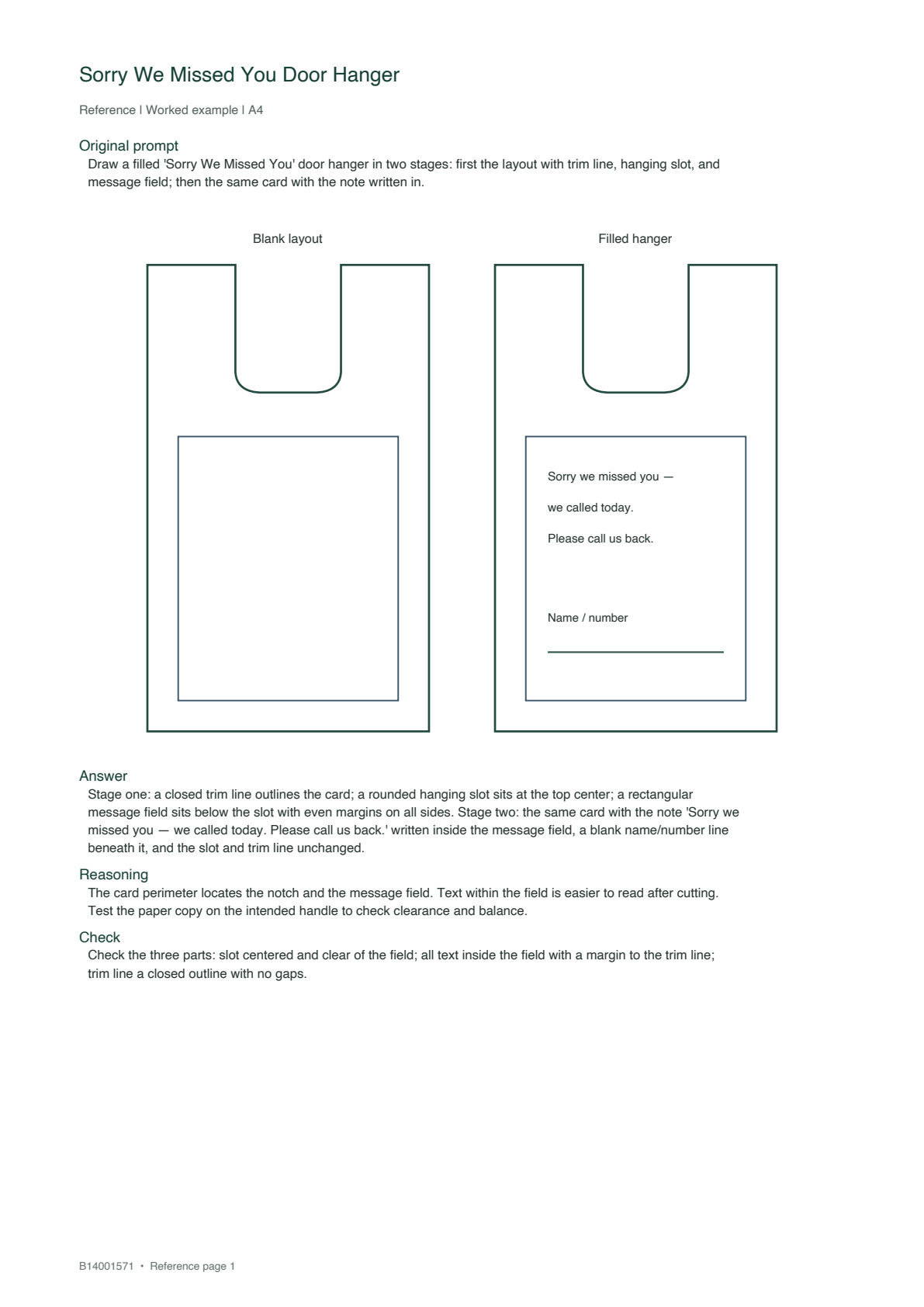
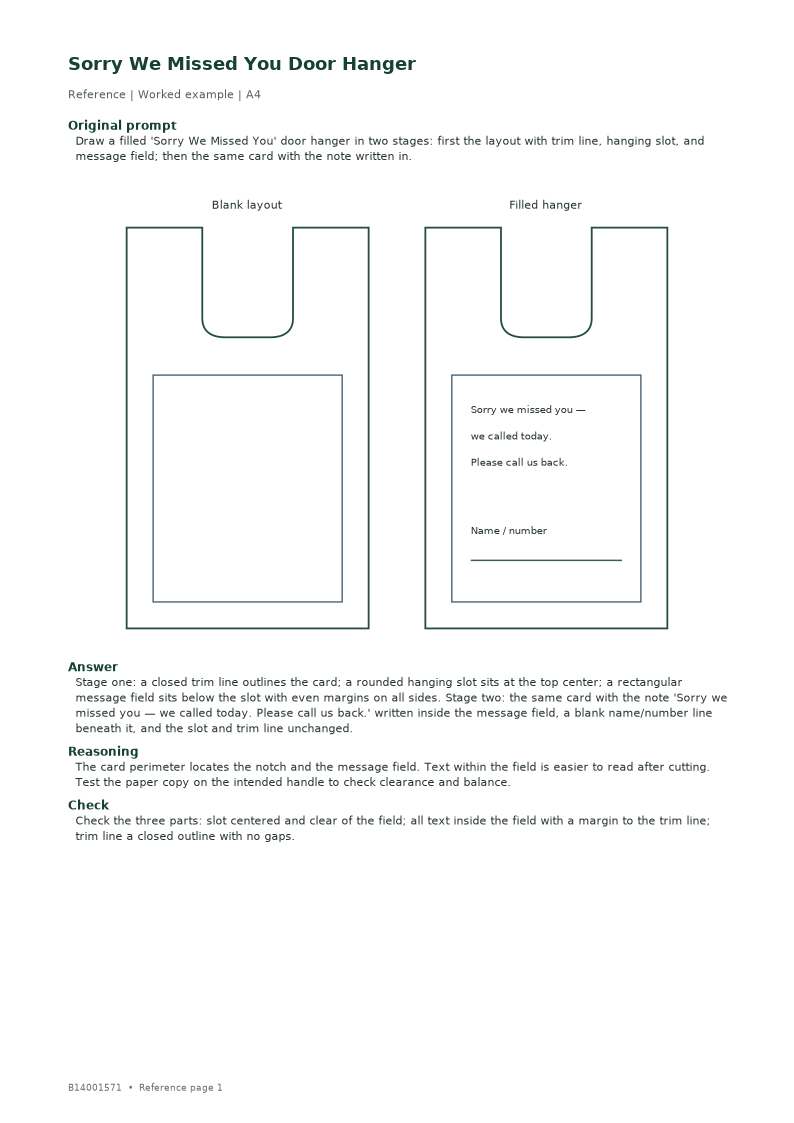
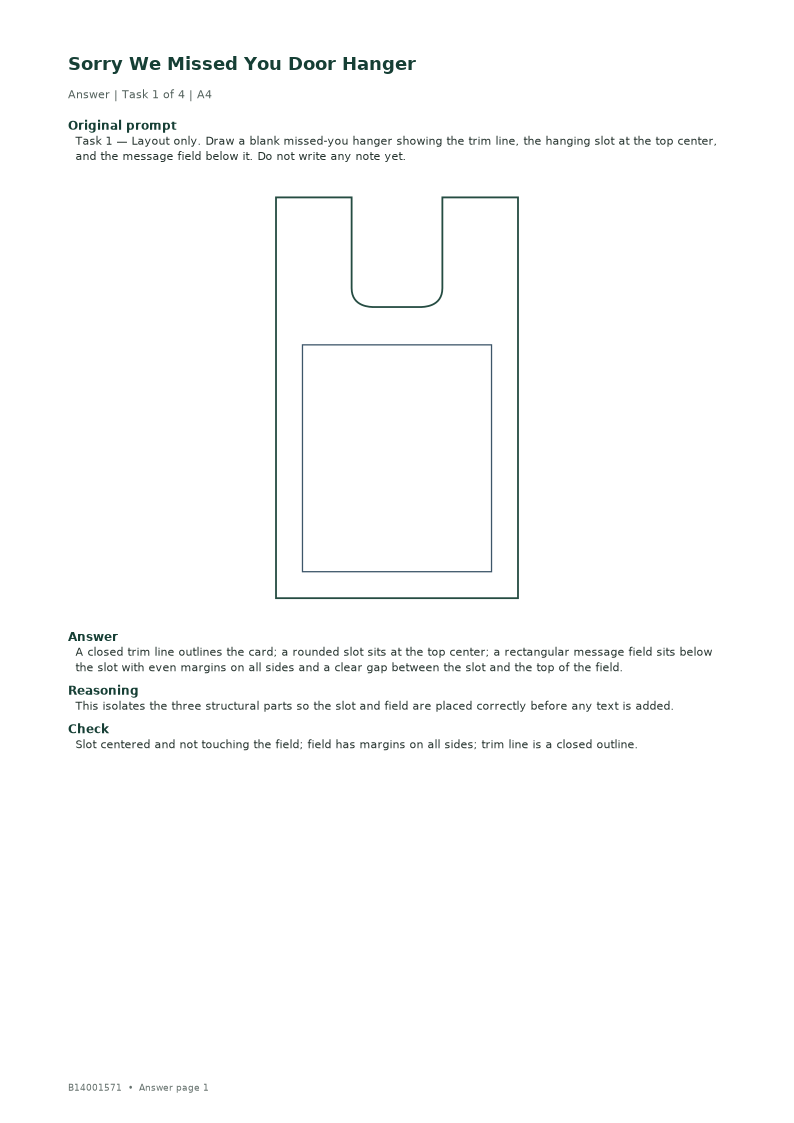
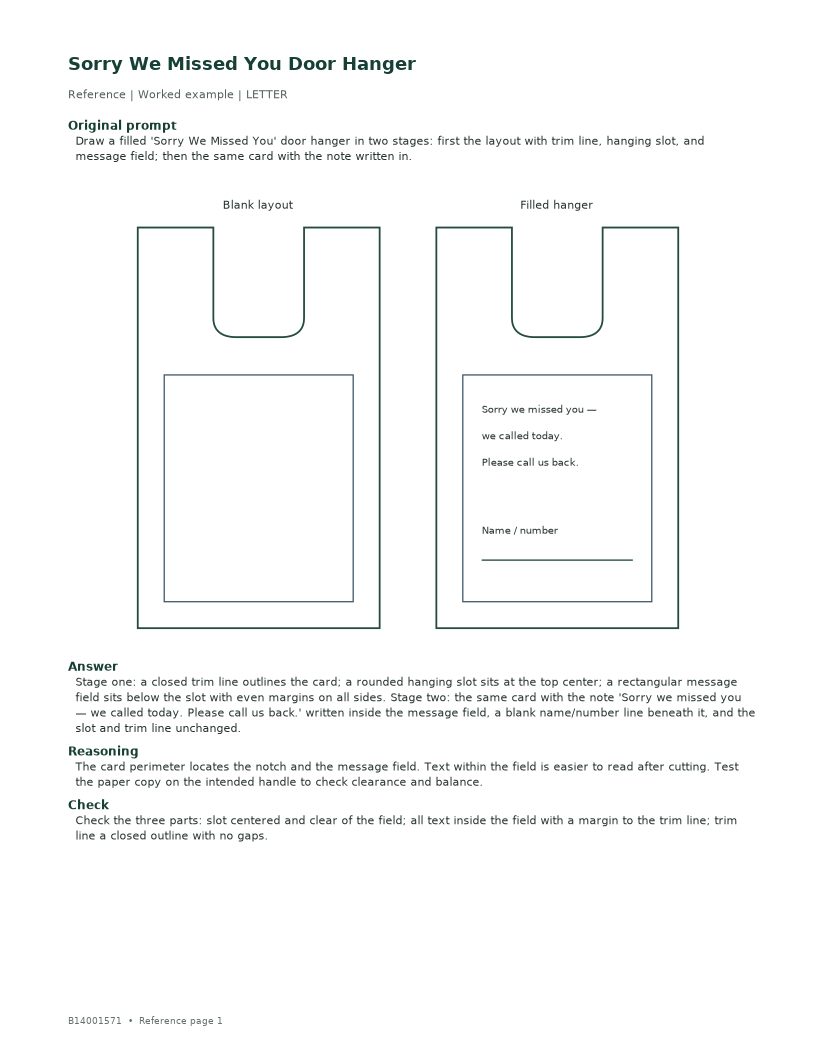
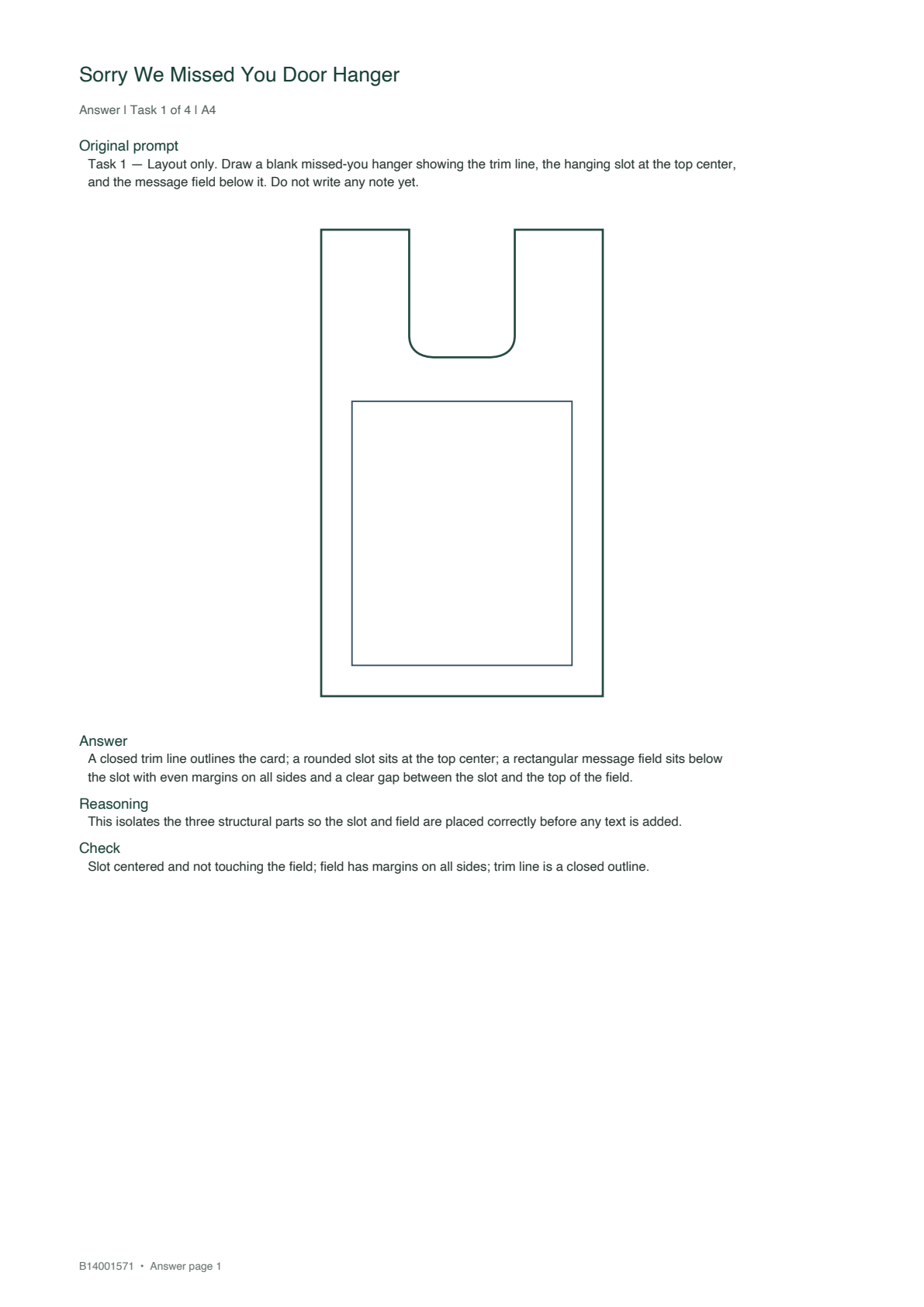
The worked example is a single card shown in two stages. Stage one is the layout: a closed trim line around the card, a rounded hanging slot at the top center, and a rectangular message field below it with even margins. Stage two is the same card filled in, with the note written inside the field and the slot and trim line unchanged.
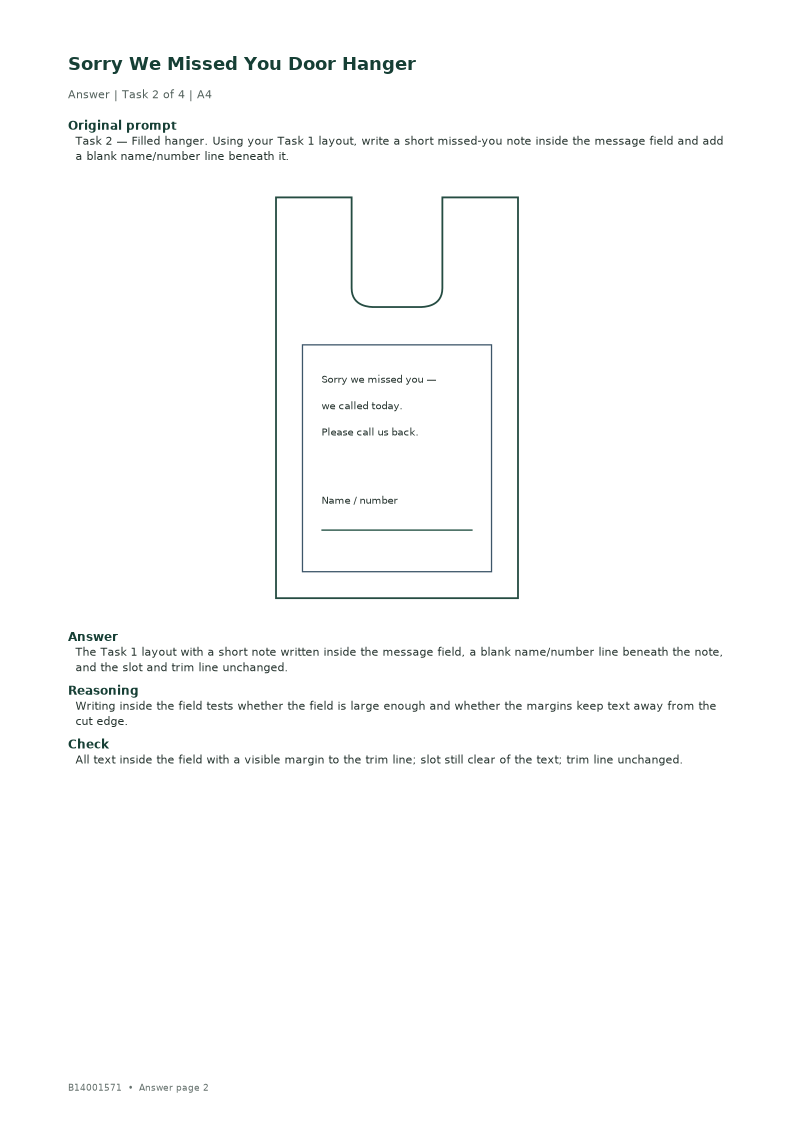
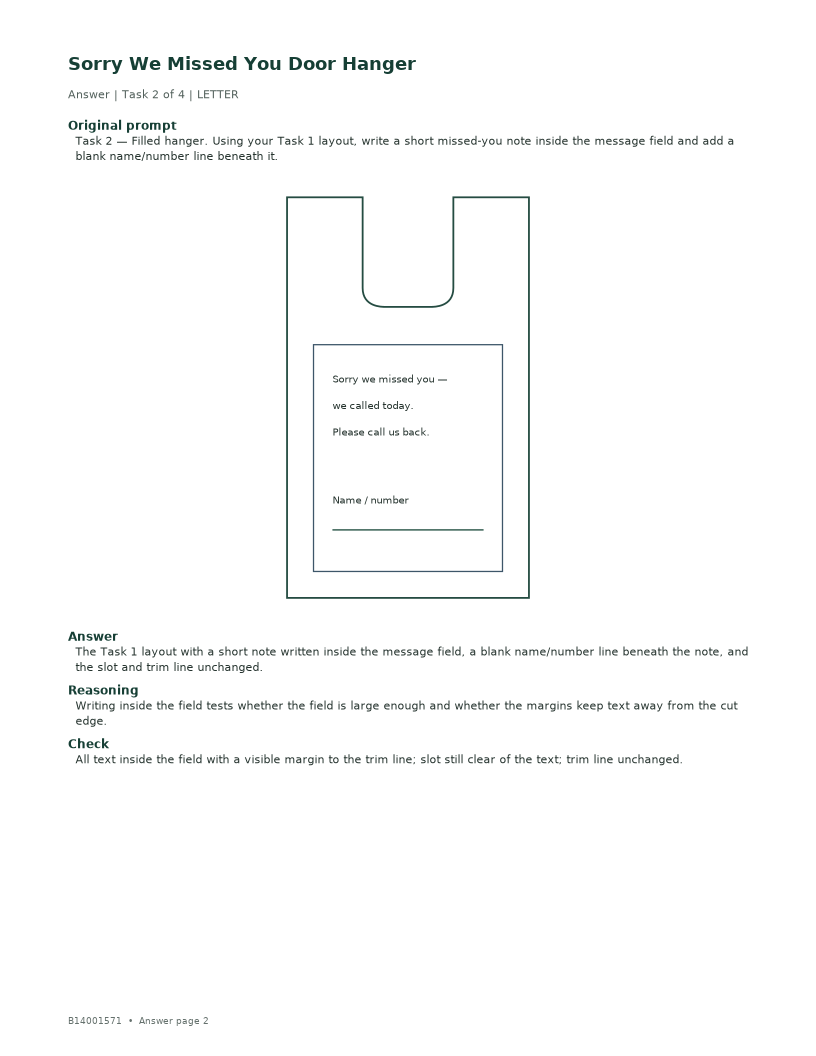
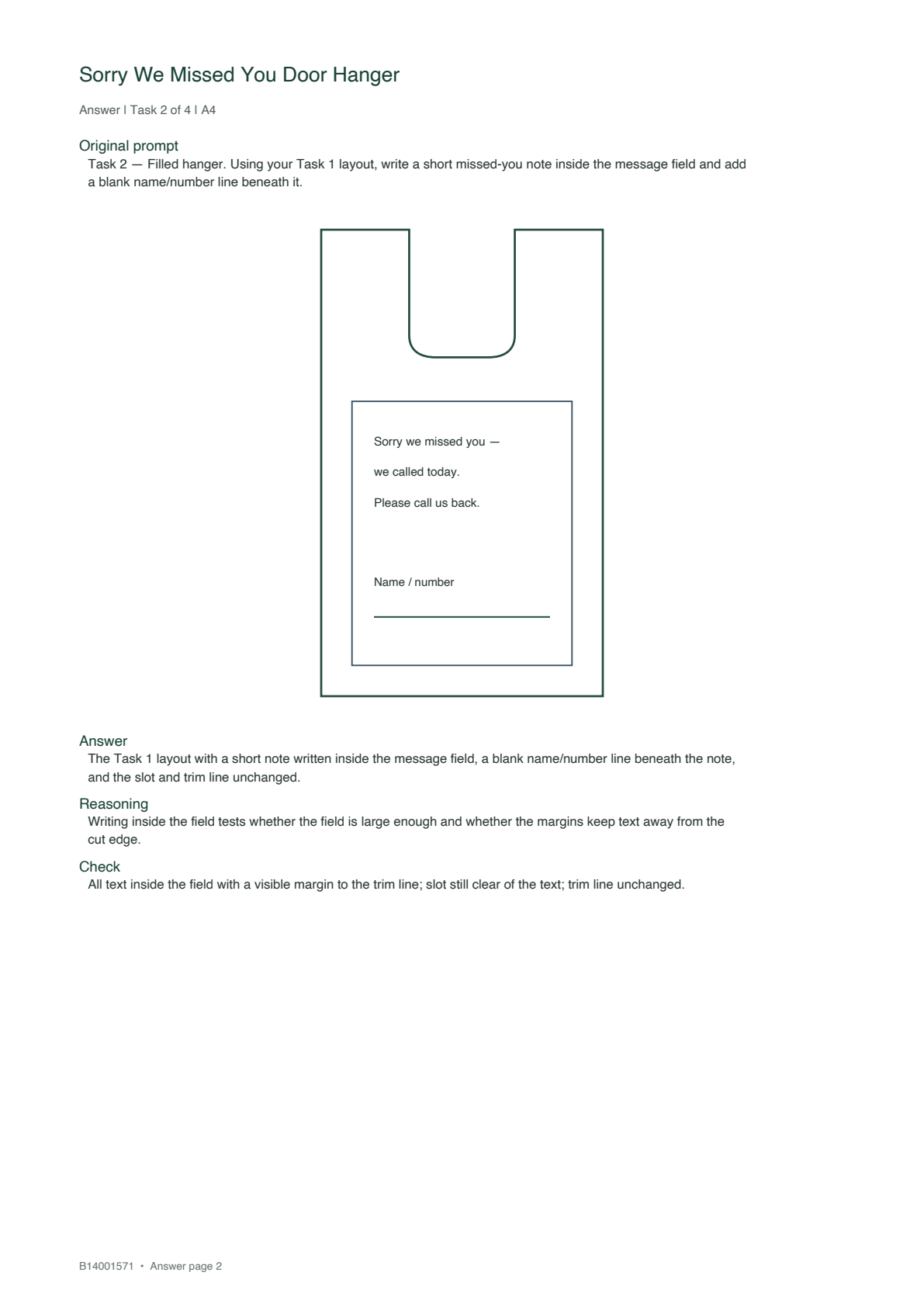
The filled note reads: 'Sorry we missed you — we called today. Please call us back.' with a blank line beneath for a name and number. This is a chosen example wording, not a required standard. The correct example keeps the slot clear of the text, keeps the text inside the field margins, and leaves the trim line as a clean closed outline.
How to check any hanger you make
Use the same three checks on every hanger. Slot check: the opening is at the top center and does not touch the message field. Field check: all writing sits inside the message field with a visible margin to the trim line. Trim check: the outline is closed and continuous all the way around.
Check the opening, the writing margins and the continuous cut path before cutting. Test a paper copy on the intended handle before making several hangers.
Download the complete resource pack
All individual SVG pages (18)
- A4 reference page 1
- A4 student page 1
- A4 student page 2
- A4 student page 3
- A4 student page 4
- A4 answer page 1
- A4 answer page 2
- A4 answer page 3
- A4 answer page 4
- LETTER reference page 1
- LETTER student page 1
- LETTER student page 2
- LETTER student page 3
- LETTER student page 4
- LETTER answer page 1
- LETTER answer page 2
- LETTER answer page 3
- LETTER answer page 4
Print at 100% / actual size. Use the stated scale on any schematic diagram; physical cutting templates are identified separately. A4 and US Letter are separate files. Free access, no signup; CC BY 4.0.
How to use these pages
- What a missed-you door hanger is
- The three parts and how they relate
- Laying out the hanger
- Worked example: a filled missed-you hanger
- How to check any hanger you make
Worked example
Example: Draw a filled 'Sorry We Missed You' door hanger in two stages: first the layout with trim line, hanging slot, and message field; then the same card with the note written in.
Answer: Stage one: a closed trim line outlines the card; a rounded hanging slot sits at the top center; a rectangular message field sits below the slot with even margins on all sides. Stage two: the same card with the note 'Sorry we missed you — we called today. Please call us back.' written inside the message field, a blank name/number line beneath it, and the slot and trim line unchanged.
Reasoning: The card perimeter locates the notch and the message field. Text within the field is easier to read after cutting. Test the paper copy on the intended handle to check clearance and balance.
Check: Check the three parts: slot centered and clear of the field; all text inside the field with a margin to the trim line; trim line a closed outline with no gaps.
Four practice tasks and complete answers
Task 1
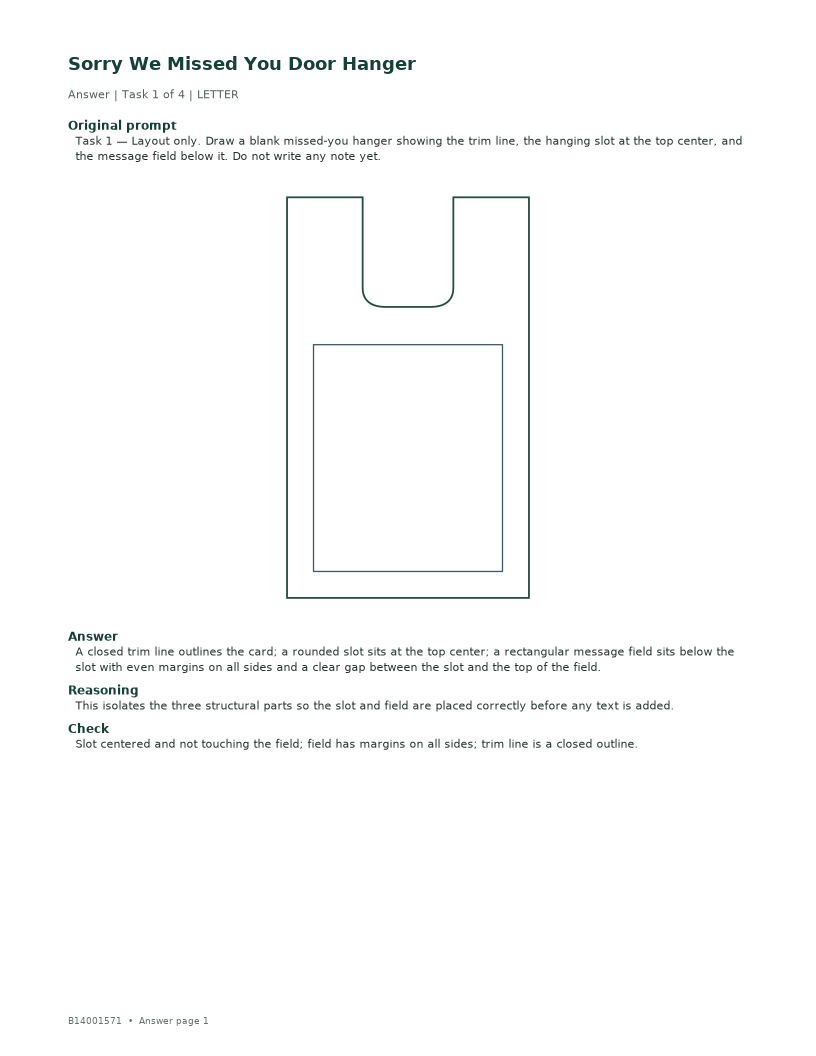
Task 1 — Layout only. Draw a blank missed-you hanger showing the trim line, the hanging slot at the top center, and the message field below it. Do not write any note yet.
Show answer 1
A closed trim line outlines the card; a rounded slot sits at the top center; a rectangular message field sits below the slot with even margins on all sides and a clear gap between the slot and the top of the field.
This isolates the three structural parts so the slot and field are placed correctly before any text is added.
Check: Slot centered and not touching the field; field has margins on all sides; trim line is a closed outline.
Task 2
Task 2 — Filled hanger. Using your Task 1 layout, write a short missed-you note inside the message field and add a blank name/number line beneath it.
Show answer 2
The Task 1 layout with a short note written inside the message field, a blank name/number line beneath the note, and the slot and trim line unchanged.
Writing inside the field tests whether the field is large enough and whether the margins keep text away from the cut edge.
Check: All text inside the field with a visible margin to the trim line; slot still clear of the text; trim line unchanged.
Task 3
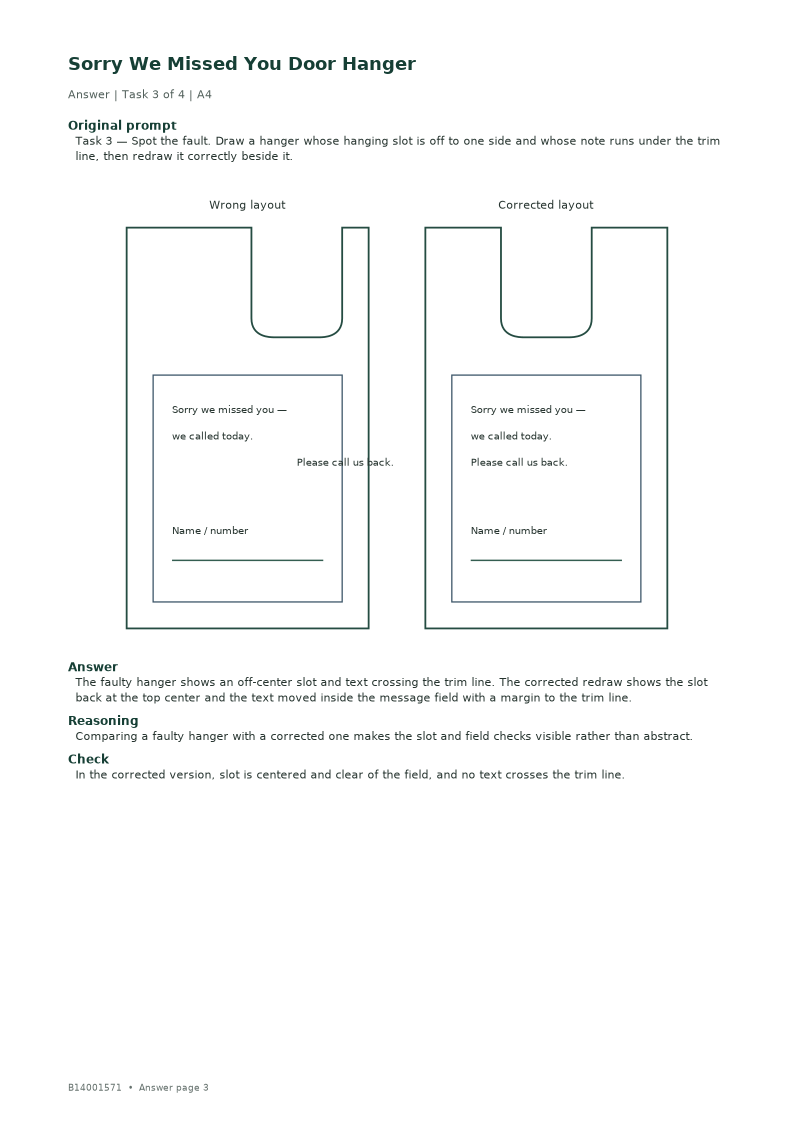
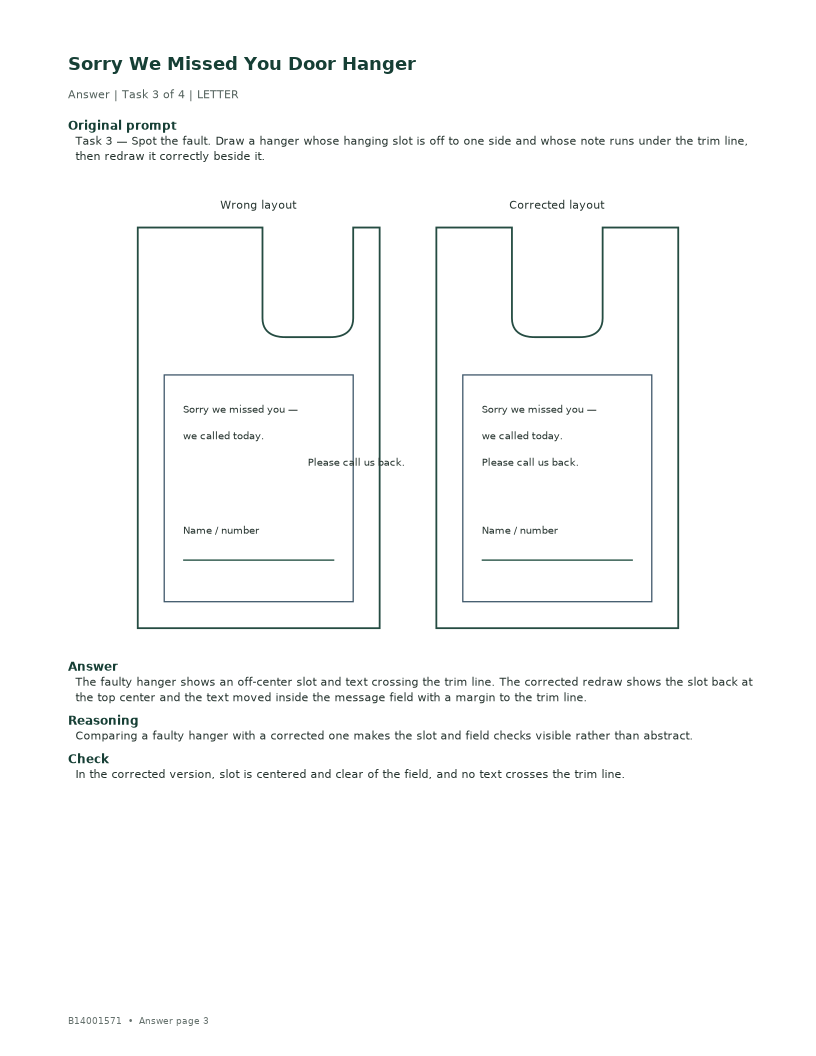
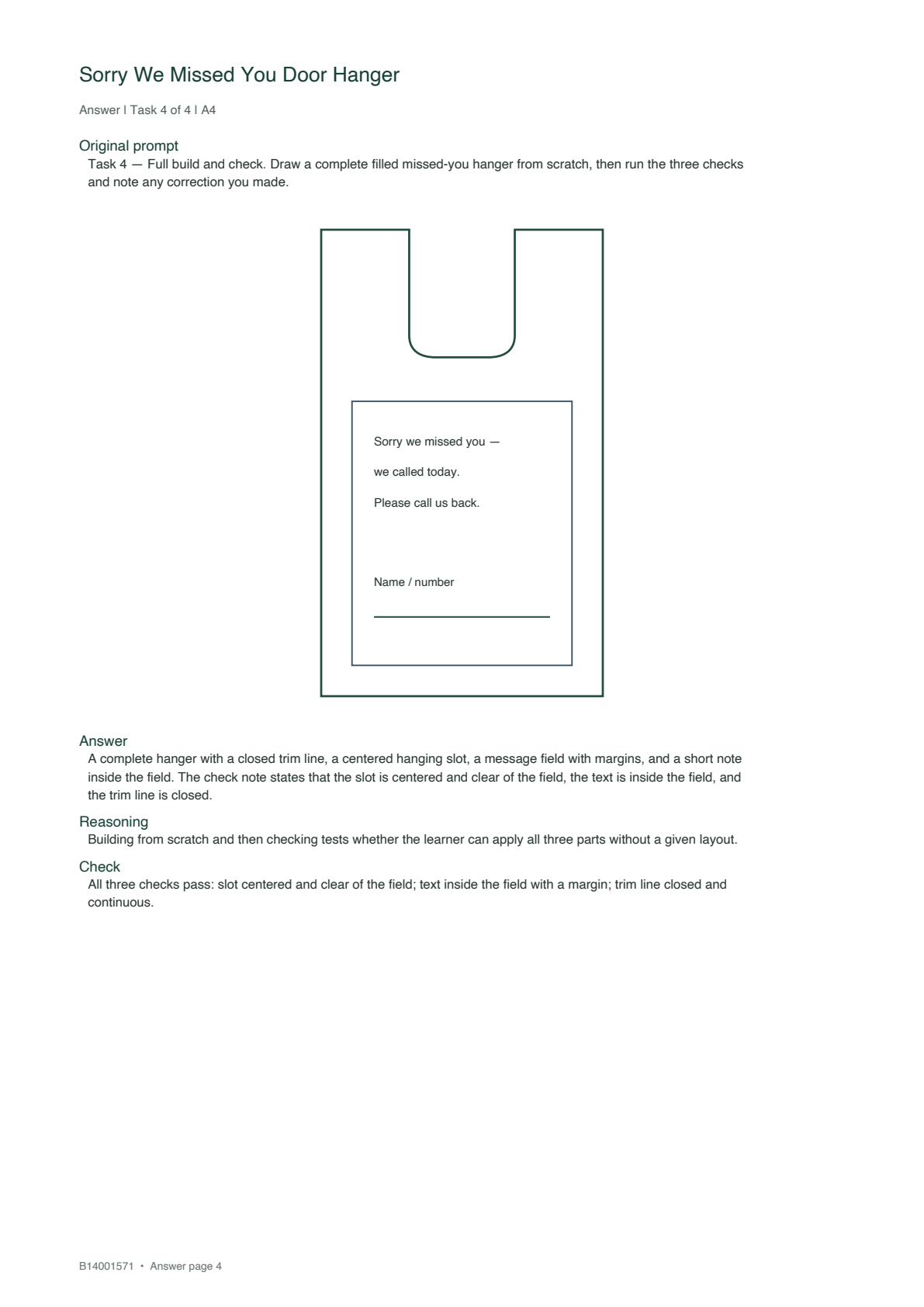
Task 3 — Spot the fault. Draw a hanger whose hanging slot is off to one side and whose note runs under the trim line, then redraw it correctly beside it.
Show answer 3
The faulty hanger shows an off-center slot and text crossing the trim line. The corrected redraw shows the slot back at the top center and the text moved inside the message field with a margin to the trim line.
Comparing a faulty hanger with a corrected one makes the slot and field checks visible rather than abstract.
Check: In the corrected version, slot is centered and clear of the field, and no text crosses the trim line.
Task 4
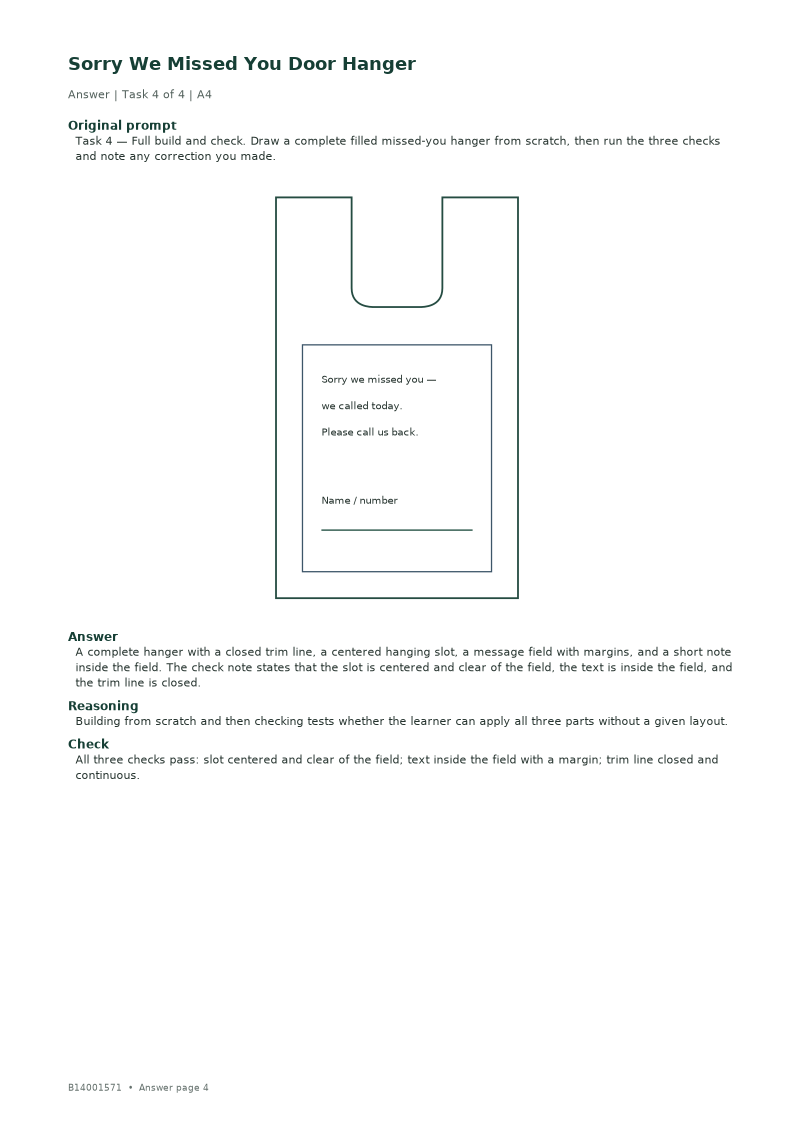
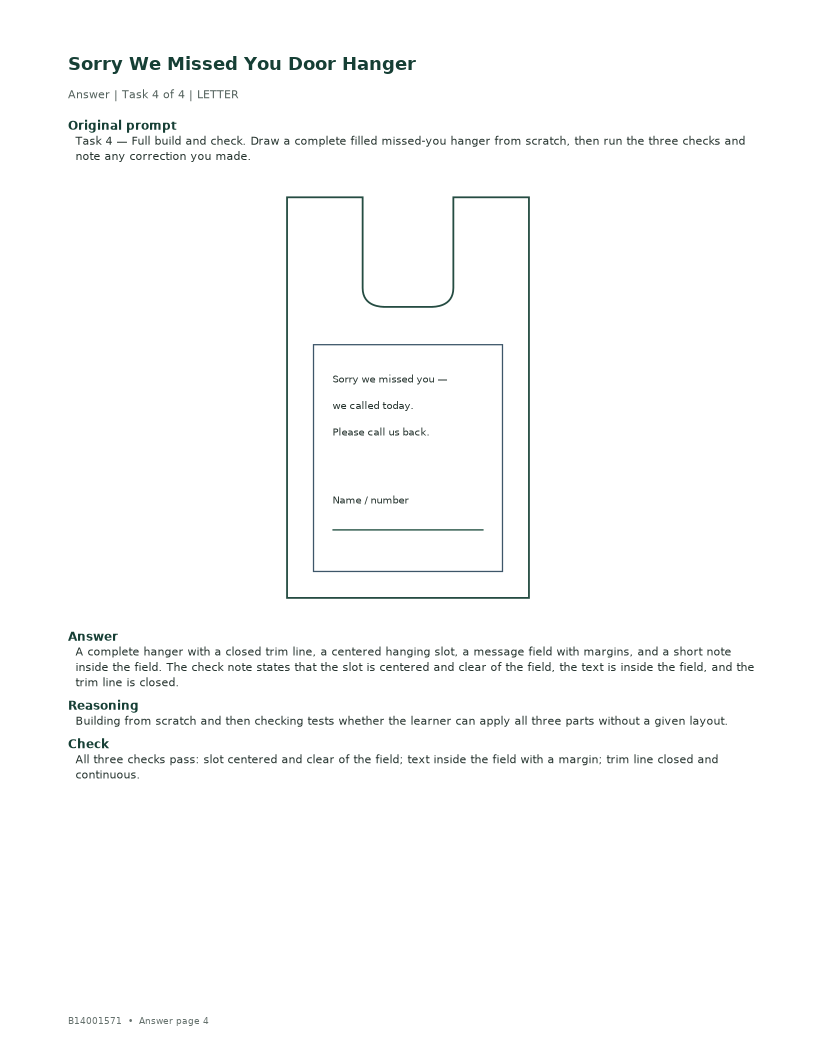
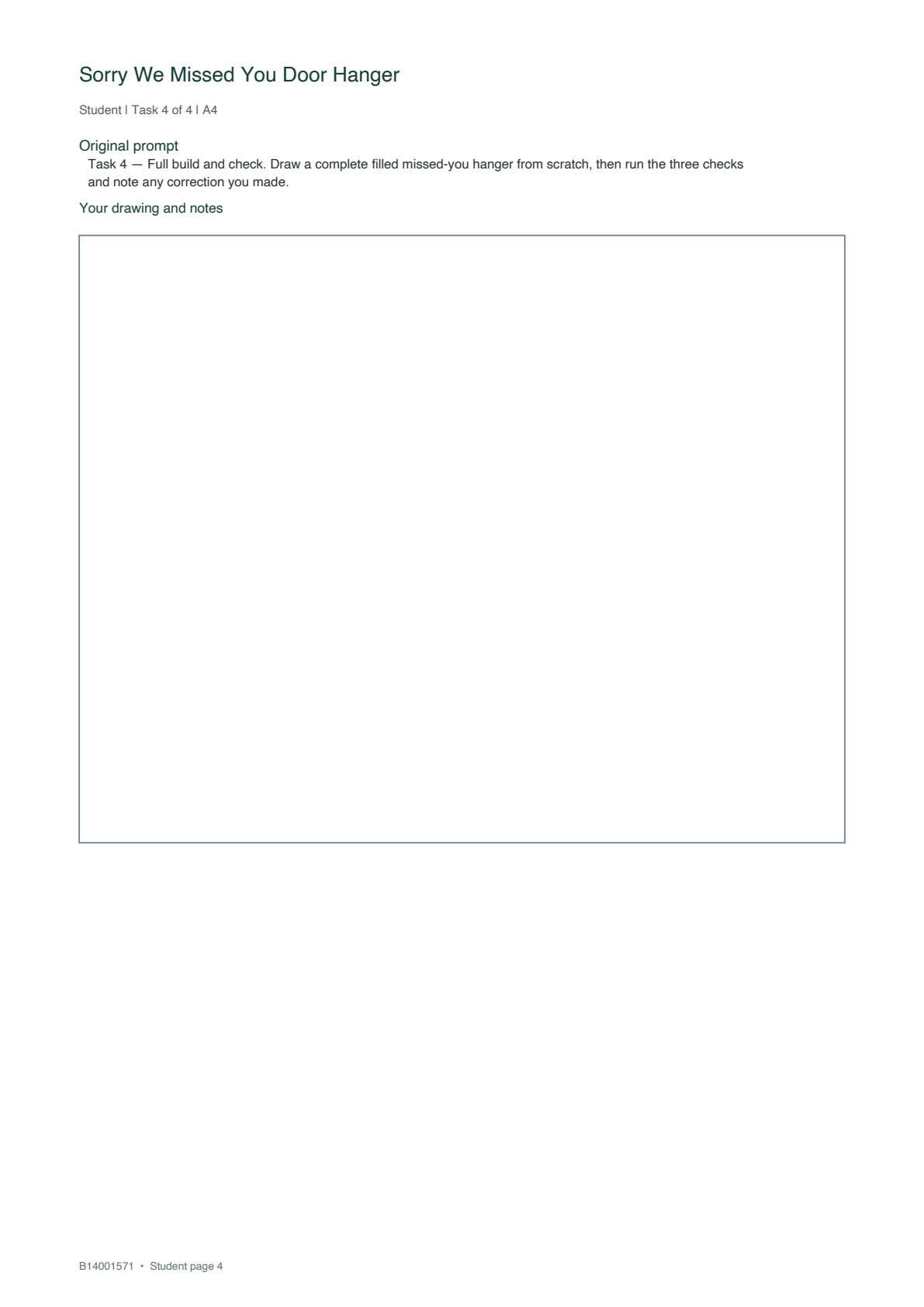
Task 4 — Full build and check. Draw a complete filled missed-you hanger from scratch, then run the three checks and note any correction you made.
Show answer 4
A complete hanger with a closed trim line, a centered hanging slot, a message field with margins, and a short note inside the field. The check note states that the slot is centered and clear of the field, the text is inside the field, and the trim line is closed.
Building from scratch and then checking tests whether the learner can apply all three parts without a given layout.
Check: All three checks pass: slot centered and clear of the field; text inside the field with a margin; trim line closed and continuous.
Useful checks
- Cutting the slot too close to the message field. Leave a clear gap between the slot and the top of the field so writing never runs into the opening.
- Writing outside the message field so text crosses the trim line. Keep a visible margin between the field and the trim line, and keep all text inside the field.
- Leaving a gap in the trim line. Draw the trim line as one closed outline all the way around before cutting.
Questions about this resource
Do I need exact measurements?
No fixed sizes are required here. Any sizes you use are your own classroom choices; measure your doorknob before cutting so the slot fits.
Can I change the note wording?
Yes. The worked example wording is a chosen example, not a standard; write any short missed-you note inside the message field.